
Get the green energy
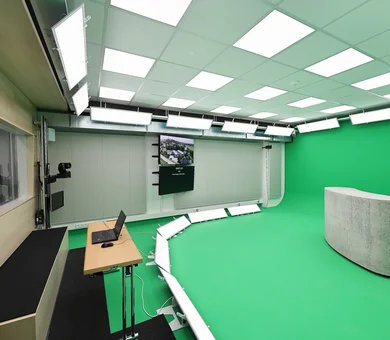
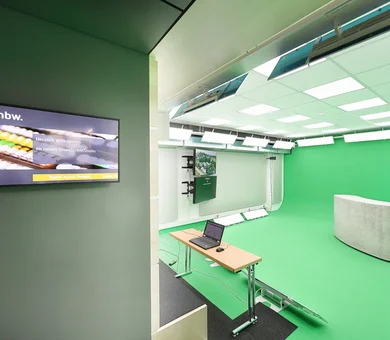
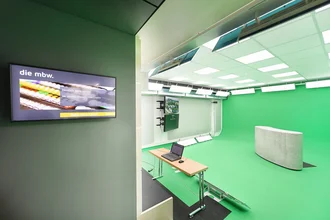
Our Greenscreen-Studio allows you to place yourself in virtual worlds. You have the option to virtually design your own studios and host your event from there. Whether it’s a live event or a recording, we’re here to support you with advice and technical assistance.
Take advantage of these virtual possibilities for employee events, company meetings, and training sessions. We also produce high-quality photos, videos, and films, regardless of location.
Frequently asked questions about the Greenscreen-Studio in munich
Are you looking to rent a green screen studio, produce a corporate video, or livestream a virtual event? Here you’ll find answers about the technology, costs, process, and preparation. Our Greenscreen-Studio in downtown Munich combines a professional green screen studio space with virtual sets, streaming technology, and personalized production support. You’ll find all the frequently asked questions here.
![[Translate to English:] Philip Schöttl – Technischer Leiter](/fileadmin/_processed_/e/c/csm_Philip-Schoettl_mbw_4faa83a67d.webp)
Let your thoughts run free!


Short overview
- 2 PTZ cameras
- Streaming computer
- Aximmetry computer
- 5 wireless systems
- 5 handheld microphones
- 5 headsets
- 3 laptops
- Presenter
- Personalized and individual consultation
- Concept development and follow-up
- Virtual settings, adaptable to your corporate identity
- Technical production
- Recording and streaming
- Connections
- Camera operators
- Audio engineers
Frequently Asked Questions about our Greenscreen-Studio
What is a green screen, and how does it work?
A green screen is a uniformly green surface against which people or products are filmed. Using a technique called chroma keying, the production software detects the green area, makes it transparent, and replaces it with an image, a video, or a virtual 3D environment. In our studio, the virtual backdrop is created using Unreal and Aximmetry technology. This allows you to appear, for example, in a digital studio, a landscape, or a custom-designed brand world.
What does “chroma keying” mean and is it the same thing as a green screen?
Chroma keying refers to the technical process in which a specific color area is removed from a shot and made transparent. A green screen is the green background against which this process is applied. Although the two terms are often used interchangeably in everyday language, they are not identical: A chroma key can, in principle, also be created using blue or any other clearly defined color.
Why is a green screen green?
Green stands out clearly from most skin and hair colors. This is why video production software can usually separate the background cleanly from the subject. Digital cameras also capture green particularly efficiently. It’s important that people and products don’t have any green areas: Anything that’s too similar to the selected key color can also become transparent during keying.
Green screen or blue screen which is better for our project?
A green screen is particularly well-suited for bright, well-lit productions and is usually the first choice for digital cameras. A blue screen may be more appropriate if green clothing, products, or logos are essential, or if the scene is intended to be darker. Our studio is equipped with a permanently installed green cyclorama. Please mention any green elements in your briefing so we can evaluate a suitable filming solution for your project.
What makes a professional green screen studio stand out?
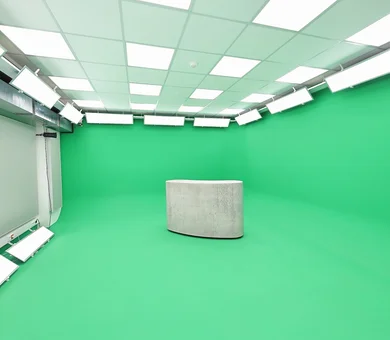
Key factors include a wrinkle- and edge-free green area, even lighting, sufficient distance between the subject and the background, and reliable camera, audio, and keying equipment. Equally important are controlled acoustics, a separate control room, and an experienced production team. Our studio features a 90-degree cove, permanently installed LED panel lights, PTZ cameras, Aximmetry and Unreal technology, professional microphones, a teleprompter, and a separate, air-conditioned control room.
What are the benefits of green screen production for businesses?
With green screen production, you can depict different locations and brand worlds without having to transport your team and equipment to multiple filming locations. A single studio can be used for various scenes, formats, and backgrounds. Virtual sets can be customized to match your corporate design and integrated with graphics, videos, or data. This makes green screen particularly useful for recurring corporate communications, product presentations, training sessions, and virtual and hybrid events.
What types of corporate videos and events is a green screen studio suitable for?
Our Greenscreen-Studio is suitable for, among other things, product demonstrations, tutorials, explanatory and HR videos, video statements, greeting messages, presentations, webinars, online training sessions, panel discussions, photo shoots, as well as media and communication training. We can also accommodate employee events, company-wide meetings, remote connections, and video segments for other events. We’ll work with you to determine whether a green screen is the best solution for your project, taking into account the format, participants, and desired visual style.
When is a green screen more practical than a real set or filming at various locations?
A green screen is particularly useful when you need multiple backdrops, real filming locations are difficult to access, or you want to create a consistent virtual brand world. Backgrounds can be changed between scenes, and digital elements can be incorporated directly into the composition. A real set may be more suitable when the focus is on real materials, intense interactions with the environment, or many reflective and transparent objects. The best solution depends on the subject matter, narrative, schedule, and desired visual effect.
Where is the Greenscreen-Studio located, and how do I get there?
Our studio is located in the Haus der Bayerischen Wirtschaft, Max-Joseph-Straße 5, 80333 Munich. We’re just a few minutes’ walk from Karlsplatz/Stachus and Odeonsplatz; the Ottostraße tram stop is also nearby. There is a limited number of paid parking spaces in the building, and additional parking garages are located in the surrounding area. Our ConferenceCenter is accessible at ground level and has elevators. If you have specific accessibility needs, please coordinate your route to the studio with us in advance.
How big is the Greenscreen-Studio, and how many people can it accommodate?
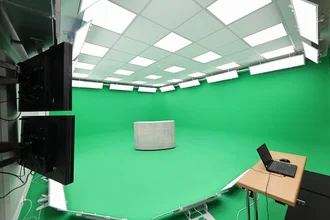
Our Greenscreen-Studio covers a total of 60 square meters. Of that, 40 square meters are dedicated to the filming area, about 35 square meters to the green area, and 13 square meters to the separate control room. The green area features a 90-degree corner cutout. The number of people who can stand in front of the camera at the same time depends on the set, movement areas, camera positions, and technical setup. That’s why we determine the appropriate capacity based on your production concept.
How much does it cost to rent a green screen studio in Munich?
We calculate each project individually because studio time, technical requirements, virtual set design, staffing, streaming, remote connections, and post-production can vary significantly depending on the project. To receive a reliable quote, please provide us with the format, your preferred date, production duration, number of participants, whether you’d like a live broadcast or a recording, and the required output files. This way, you’ll receive a quote that’s tailored exactly to your project and scope of services.
What factors determine the cost of a green screen production?
The costs depend primarily on the studio and production duration, the complexity of the virtual set, the number of cameras and participants, and the production staff required. Depending on the project, additional costs may include concept development, rehearsals, livestreaming, remote connections, graphics, editing, animations, review rounds, or additional spaces. We offer technical production as well as concept development, streaming, and post-production, and tailor the scope of services specifically to your project.
Can I book the studio by the hour, for half a day, or for a full day?
The appropriate booking duration depends not only on the actual shoot. Setting up the virtual set, construction, technical rehearsals, and teardown also take time. Therefore, when submitting your request, please specify the estimated shooting time, the number of scenes, and the services you require. We will then recommend a suitable production window and prepare a customized quote.
What equipment and services are available at the green screen studio?
Our studio is equipped with, among other things, PTZ cameras, permanently installed LED lighting, Aximmetry and Unreal technology, streaming systems, wireless, handheld, and headset microphones, a digital audio mixing console, monitors, a teleprompter, a network, and fiber-optic cabling. We also offer consulting, virtual sets, technical production, recording, streaming, remote connections, and camera and sound crew. We’ll work with you to determine which technology and services your project requires and which will be included in the quote.
Can I just rent the space, or do you also offer full-service video production?
We offer a full-service production package: from consultation and concept development to virtual sets and technical implementation, all the way through to recording, streaming, and post-production. This allows you to carry out your project with a single, dedicated production team. If you need only the studio or specific services, please specify this in your inquiry. We will then determine the appropriate solution and the available in-house technical resources.
Can we bring our own camera crew, our own equipment, or our agency?
If you’d like to incorporate your own production partners or equipment, please coordinate this with us well in advance. This will allow us to review connections, signal paths, power requirements, networking, camera positions, workplace safety, and responsibilities in the control room beforehand. It’s best to include a technical list, the contact information for the production manager, and a preliminary schedule with your inquiry. We’ll then determine how your crew can be effectively integrated into our studio setup.
How does the process of requesting and booking the green screen studio work?
First, let us know your preferred date, format, production goal, number of participants, whether you’d like a live broadcast or a recording, and the services you need. We’ll then work with you to finalize the virtual set, technology, staff, content, and post-production. You’ll then receive a customized quote. Once the project is commissioned, we’ll work with you to finalize the production schedule, file delivery requirements, rehearsals, and workflow.
How much lead time is needed for a green-screen production, and are last-minute bookings possible?
The required lead time depends on the scope of the project. A simple shoot with an existing background requires less preparation than a newly developed 3D set, complex graphics, multiple remote locations, or a livestream. Studio availability, staffing, rehearsals, and approval cycles also affect the schedule. Please inquire as early as possible with a complete briefing. We’ll review your specific project to determine whether a last-minute booking is possible.
Can you handle both live events and pre-produced recordings?
Yes. We produce live events and livestreams as well as pre-produced recordings. For example, you can livestream a webinar or a company-wide meeting, fully pre-produce a corporate video, or integrate recorded segments into an event later on. The best combination depends on the level of interaction, approvals, scheduling risks, and desired post-production work. We plan the specific technical and editorial implementation individually for your project.
Can webinars, company-wide meetings, and hybrid events be live-streamed?
Yes. In our studio, we produce webinars, employee events, company-wide meetings, as well as virtual and hybrid event formats. To do this, we use professional streaming systems and a fiber-optic connection. We work with you to define the streaming destination, access controls, interaction options, expected audience size, recording requirements, and any necessary redundancy as part of the concept. We also coordinate the appropriate platform and technical configuration with you.
Can external speakers or interview partners be connected live?
Yes, we can integrate external participants into a live production via video and audio. The number of people who can be connected simultaneously and the most appropriate connection method depend on the production concept, platform, and internet conditions at the respective locations. Therefore, please let us know the number of guests, their locations, and the technical capabilities available well in advance. We’ll conduct a connection test before the event to ensure that video, audio, and the return channel are set up reliably.
Can virtual backgrounds be customized to match our corporate design—and can we see the result during filming?
Yes, we adapt virtual sets to your corporate design. Colors, logos, presentation areas, and other brand elements can be integrated into the digital environment. Aximmetry and Unreal combine the camera feed and the virtual set in real time, allowing you to see the composite image even during production. We plan the scope, design, and preview options to suit your production setup.
Can presentations, logos, graphics, videos, and numbers and data be integrated into the virtual set?
Yes. We can incorporate logos, presentation areas, videos, statistics, and other visual elements into the virtual setting. Possible elements include digital screens, animated numbers, or freely positioned graphics. To ensure the content is clearly legible and fits the flow of the presentation, we plan and test the position, size, timing of the display, and any animations in advance. After reviewing your files, we’ll determine whether they can be used as-is or need to be adapted for the virtual environment.
What files and content do we need to provide for the background, presentation, and video clips?
Typically, we’ll need your logo and corporate design guidelines, approved presentations, images, videos, text, fonts, and, if applicable, 3D models. In addition, a script, storyboard, lists of voice-over artists and audio clips, as well as information on usage rights, are helpful. The exact list of deliverables depends on whether an existing setting is being adapted or a new virtual environment is being developed. After the technical briefing, you will receive a project-specific asset list.
What file formats, resolutions, and aspect ratios are required and by when?
The requirements vary depending on the delivery method, such as a 16:9 livestream, social media clip, presentation, or 3D object. That’s why, before production begins, you’ll receive project-specific guidelines for images, logos, videos, presentations, fonts, and 3D data. These guidelines should also specify the color space, transparency, audio, file naming conventions, delivery method, and deadline. Please send test files as early as possible so that any necessary adjustments can be made before the studio session.
Do you have a teleprompter, and do you provide assistance with operating it?
Yes, our Greenscreen-Studio is equipped with a 24-inch teleprompter. This allows you to read a prepared script as close to the camera axis as possible. To ensure a natural result, we’ll work with you in advance to test the script, font size, speaking pace, and line breaks. When you submit your request, please let us know if you’d like to use the teleprompter and if you need assistance with preparing the text or operating the device.
Do you provide support with the concept, script, storyboard, and production planning?
Yes. We provide support through personal consultation, concept development, and follow-up, as well as technical and dramaturgical production planning. When you submit your inquiry, please let us know what materials you already have and whether you need help with, for example, format development, the script, the storyboard, voice-over scripts, or the director’s script. This will allow us to include the appropriate editorial support in your quote.
Are directing, camera work, sound, editing, and post-production available for booking or already included?
We offer technical production, camera and audio crews, recording, streaming, as well as concept development and follow-up work. Separate directing services and the corresponding camera, sound, and editing equipment are available. The services you need and which ones are included in the price depend on your project. We clearly list the number of staff members, editing, color correction, sound mixing, animations, revision cycles, and final versions in your quote.
When and in what formats will we receive the finished video and can we also get the raw footage?
Delivery time, file formats, and the provision of raw footage depend on the scope of filming, editing, animations, approval cycles, and distribution channels. In the proposal, we’ll coordinate with you on the delivery date, the master format, web and social media versions, subtitles, audio versions, data transfer, and the archiving period. We’ll also specify whether you’ll receive individual camera clips, audio tracks, graphics, or raw footage, and what usage rights apply to them.
What should you wear in front of a green screen and what colors should you avoid?
Wear solid-colored, matte clothing that contrasts clearly with the green background. Avoid green as well as similar shades of turquoise or yellow-green, as these can become partially transparent during keying. Very light-colored or highly reflective fabrics should also be tested. Ideally, bring one or two alternative outfits and send us photos in advance. If green brand colors or clothing items are essential, we’ll explore an alternative filming solution.
Are fine patterns, shiny fabrics, jewelry, glasses, or loose hair problematic?
They can be problematic, but they don’t have to be. Very fine stripes or checks can create moiré patterns. Shiny fabrics, jewelry, and eyeglass lenses can reflect studio lighting or a green cast. Individual, semi-transparent strands of hair pose greater challenges for keying than clear contours. Therefore, choose plain, matte fabrics, understated jewelry, and, if possible, anti-reflective eyeglasses. Loose hair is generally acceptable; however, the outfit, hairstyle, and accessories should be tested in the camera frame before filming.
What happens if a product, logo, or piece of clothing is green?
Green areas can be removed along with the background during chroma keying, making them appear transparent. This also applies to small logos, reflected shades of green, and details on the product. Therefore, please mention such elements in the briefing and send us photos or samples. Possible solutions include adjusting the image crop, masking individual areas, or more complex compositing. We’ll assess in advance which solution is technically feasible and cost-effective for your project.
I’ve never been in front of a camera before. How should I prepare, and how will you support me during the shoot?
Prepare your key message, target audience, and desired call to action, and practice reading the text aloud. Short, spoken sentences usually sound more natural than written language. Set aside time for a sound check, teleprompter test, and camera setup. We offer customized communication and presentation training and provide both advisory and technical support for your production. If you’d like personal on-camera coaching on the day of filming, please indicate this in your request.
What should we prepare before the studio session and bring with us to the shoot?
Prepare your objectives, schedule, script, presentations, logos, video clips, and approved corporate design files. Bring any necessary products, props, and, if possible, alternative clothing suitable for green-screen use. Also, clarify voice-over clearances as well as music, image, and brand usage rights. For live productions, access credentials, the guest list, remote connections, and emergency procedures should be tested. After the technical briefing, we’ll provide you with a project-specific checklist.
More questions about the hbw ConferenceCenter
More Questions, More Answers
You can find our comprehensive FAQ here.
